
UV printing service
Preparing your artwork for UV printing
If you’re planning on getting some custom printed restraints, this page provides all the information you’ll need to make sure you get exactly the results you’ve been dreaming of.
Not everyone needs to prepare artwork; it’s mostly for people who want to design their restraints’ prints in depth, and for those seeking particularly technical effects.
If the artwork you’d like to use is by another artist, make sure to get their consent.
This page is a work in progress and will change. It was last updated on the 2nd of September, 2026.
How to design for your restraints
When you order UV printing for your restraints, there are two routes you can take. You can use our online artwork layout tool to design your restraint printing with simple text, icons and symbols, QR codes etc, and most other artwork with relatively straightforward requirements. If you have highly specific layout requirements, or you want precise control over layers and effects, you can upload prepared artwork that we process to get your exact specifications perfected. In either case, we send you a proof of your design before sending to print, and if we have any questions about any part of your design, we’ll make sure you’re happy with it before we send your restraints into printing.
Artwork checklist
Before submitting your artwork, please make sure your artwork is ready:
Text
-
Provided in plain text, or as part of an image
-
In a font we can readily access, or supplied with font files if you have an exact font requirement.
Images & bitmaps
-
In a suitable format:
-
Photoshop (PSD), PDF etc
-
PNG files, with transparency information if required
-
JPEG and other formats if they’re the best quality file you have
-
-
In as high resolution as possible
-
Recommended: 1,200dpi
-
Minimum: 300dpi
-
-
Cropped to only what you want printed
Vector files
-
In a suitable format:
-
SVG or Adobe Illustrator (AI) format
-
Files contain colour information
-
-
Cropped to only what you want printed
Unsuitable artwork
Artwork is unsuitable for print if:
-
It’s a screenshot or very low quality image
-
It was generated by “artificial intelligence”
-
It falls foul of our terms of service
What you can design on the online artwork layout tool
Most customers will not need to specifically prepare artwork ahead of printing. If your design meets the descriptions below, you’ll be able to use the online layout tool to design your prints from start to finish:
-
If your design contains text:
-
You can provide the text to us in plain-text format
-
You would like your text to be aligned to the right or left of the locking latch, centred on the restraint band or printed all-over
-
You don’t have exact pixel-perfect layout requirements
-
You don’t want complex texturing on your text
-
-
If your design contains raster/bitmap images:
-
Your image file is suitable for print, meaning
-
For the size you would like it printed, it is at least 300dpi resolution. This means a 300px high image for a 25mm strap at full width. We recommend at least 600dpi and prefer 1,200dpi as the best quality
-
In an appropriate format; please provide us the highest quality file you have, preferably original source files
-
Where you would like a transparent background, it is included in the file
-
-
You can describe the size and position easily using our configuration tools and do not need pixel-perfect layout precision
-
If you would like an all-over print, the image can be cropped and resized by us to best fit the restraint and you do not need pixel-perfect layout precision
-
You do not need bump-mapping/texture relief on your image
-
-
If your design contains vector graphics:
-
You can describe the size and position easily using our configuration tools and do not need pixel-perfect layout
-
Your files are in SVG or Adobe Illustrator (AI) format
-
Your provided files contain colour information
-
You don’t want complex texturing on your graphics
-
What you need to prepare artwork separately for
If any of the following describes your design, we may need you to prepare artwork for us:
-
You have exacting requirements for positioning, size, colour accuracy or any other technical aspects of the design
-
Your artwork is likely to take a long time to assemble due to complexity
-
You would like complex textures on your print, or if you would like images to be bump-mapped or texture relieved
-
You would like to incorporate any special inks where they do not apply to the whole image:
-
Fluorescents where they are spot use
-
Varnish where it is spot use or where more than one finish is required
-
-
You would like to use fluorescent inks to expand the colour space of your artwork outside normal CYMK colours
-
You would like artwork to wrap around both sides of straps
If you would like to prepare artwork, please follow the guidance below and supply your design files at time of order or afterwards. If you are unsure if you need to prepare artwork, order as normal and we’ll contact you if we need more information.
If you have complex design goals and don’t have the experience or software to do so, we’re more than happy to do it for you! We charge our standard custom service fee for artwork setup, pro rated for each 15 minute period after the first 15 minutes. This means if your artwork takes less than 15 minutes to set up, there’s no charge. Therefore, providing any files or designs you have, and/or rough sketches or detailed descriptions is extremely helpful.
If we need to set up your artwork for you, we will never charge you without talking with you about it first.
How to set up your artwork
To get artwork ready to print, follow the steps below for the best results:
Set your artwork size
Your artwork should be at least 300dpi resolution, meaning that a 25mm (1 inch) wide collar strap should have artwork of at least 300 pixels high. Higher resolution artwork is encouraged!
-
Set your height to the width of the restraint strap you’re ordering; 19mm for cuffs, 25mm for collars etc.
If you would like a smaller design
If you would like to order printing that only covers part of your restraint strap, please make sure it’s the right size so it turns out right. If you would like exacting control over where the print sits, use the guide for full-coverage printing below.
-
Set your width to the width of your artwork.
You should add the following bleed allowance:
-
All restraints
-
Top and bottom allowance of 3mm
-
Left and right allowance of 3mm
-
If you are using software which does not support bleed allowances natively, add the following extra size to your canvas:
-
All restraints
-
Additional height of 6mm
-
Additional width of 6mm
-
If you would like full-coverage printing
If you would like to order a full-coverage design, please make sure you provide artwork big enough to cover your entire restraint strap.
-
Set your width to the size of your ordered restraint. For example, if you order a cuff of size 20cm, set your artwork to 200mm (20cm).
You should add the following bleed allowance to ensure your printing does not have harsh edges visible on the strap:
-
19mm cuffs
-
Top and bottom allowance of 3mm
-
Left and right allowance of 17.5mm
-
-
25mm collars
-
Top and bottom allowance of 3mm
-
Left and right allowance of 20mm
-
-
Locking waist belts (25mm straps)
-
Top and bottom allowance of 3mm
-
Left and right allowance of 30mm
-
-
Locking waist belts (38mm straps)
-
Top and bottom allowance of 3mm
-
Left and right allowance of 40mm
-
If you are using software which does not support bleed allowances natively, add the following extra size to your canvas:
-
19mm cuffs
-
Additional height of 6mm
-
Additional width of 35mm
-
-
25mm collars
-
Additional height of 6mm
-
Additional width of 40mm
-
-
Locking waist belts (25mm straps)
-
Additional height of 6mm
-
Additional width of 60mm
-
-
Locking waist belts (38mm straps)
-
Additional height of 6mm
-
Additional width of 80mm
-
Establish your layers
When assembling your art, you should use layers unless you are designing graphics that simply use one CYMK “pass” that has a uniform final surface, without special effects. This means that if you have a flat image or text that could be printed on your printer at home, you don’t need to provide layers. If you want to avail of any of the optional effects below, please use layers.
We recommend the following layout:
-
Top layer
-
Spot foil areas (alpha channel not supported)Not yet available -
Textured bump map (mapped to alpha channel, 100% opacity is max height, 0% opacity is zero height, provide max height in layer name or notes supplied with graphics)
-
Spot varnish (use layer names for matte, satin, gloss etc, and one layer for each spot effect if more than one)
-
Spot white
-
Spot fluorescent areas (alpha channel supported. Define exact colours in layer names or notes supplied with graphics if required)
-
Main artwork layer (required)
-
White base or spot layer
-
Bottom layer
If you are using software which does not support layers natively, please name your supplied files clearly to describe what each layer is, and provide notes on specifications if required.
Lay out your artwork
Get creative! Now you can lay out exactly what you would like us to make.
Define out-of-CYMKW colours
Optional
We can print fluorescent colours that are much brighter than standard printer ink colours can provide. If you would like to avail of this extended gamut, please use an RGB colour profile, and define any exact colours you’d like in swatches or in notes using colour codes or reference names.
If you provide us artwork in CYMK format, colours will be flattened when converting to RGB and will appear duller than intended.
Define spot colours
Optional
If you would like us to use spot fluorescent colours to add particular highlights to your printing, please define these as swatches or use descriptions in the artwork notes. Please provide these as separate layers.
Define white use
Optional
We can print light colours on dark straps, but this requires an under layer of white. We will assume you want this unless stated.
If you would like light colours on darker straps to achieve a subtle, dark look, let us know in artwork notes.
If you would like us to use white as a spot colour to add highlights etc, define these in layers. We can print white both above and below your main artwork, which creates different effects. White under coloured ink hides the strap colour and brings the CYMK artwork to true colour, and over the coloured ink adds pure white highlights.
Define varnish and texture mapping
Optional
If you would like a finishing layer of varnish, please define this as a separate layer, and let us know what finish you would like in layer names or artwork notes. Matte, satin and gloss are available. If you would like to use more than one effect, please define these separately and use different layers.
If you would like textured prints, please let us know what thickness in your artwork notes, and how you’d like us to render it. If you would like to define custom texturing, please use a separate layer and define heights using opacity or white level, and provide artwork notes which define how thick you would like it.
Get some assistance
Optional
If you need some help setting up your artwork or need us to look over it before committing to it, let us know and get in touch! Don’t worry, we will contact you if there’s issues with submitted artwork and will provide proofs to you in any case.
Tools for artwork setup
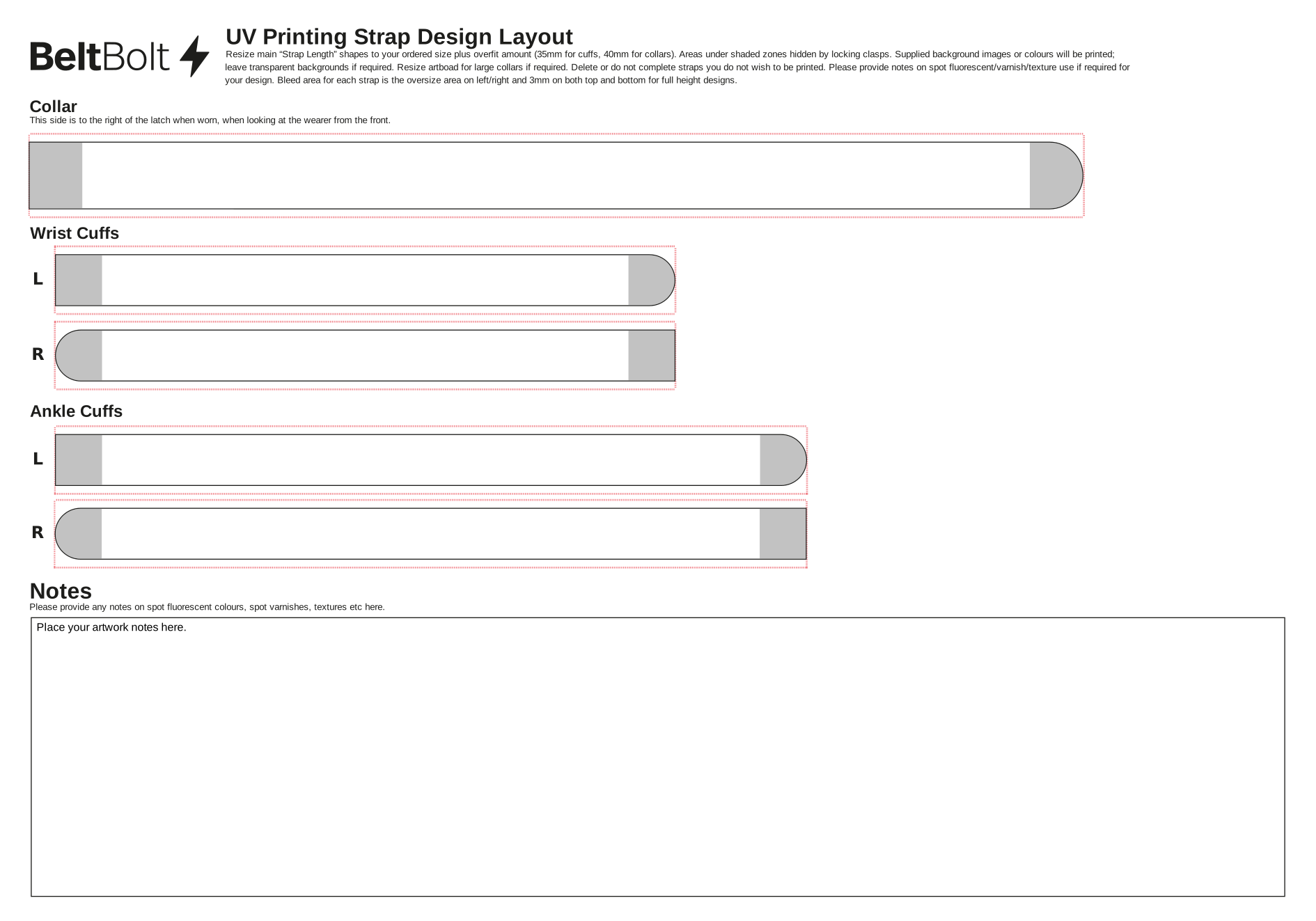
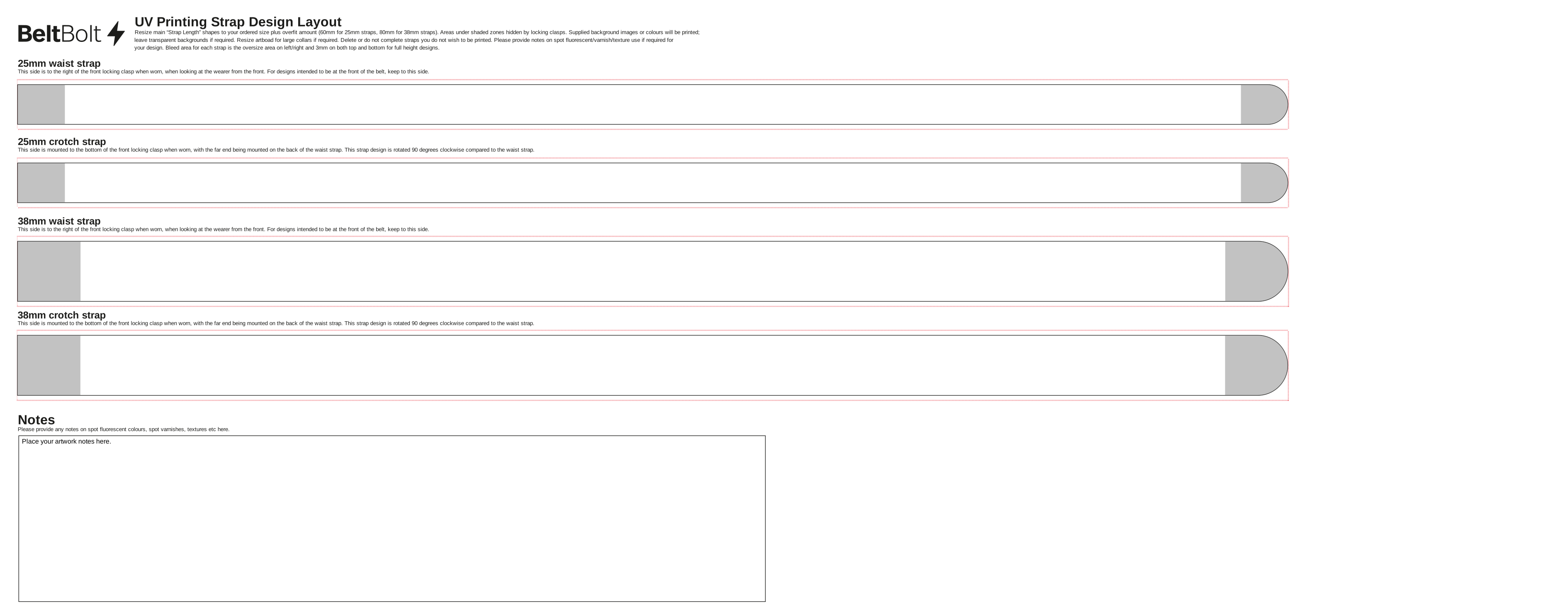
If you would like to set up your own artwork, we have built templates for laying out cuffs, collars and locking waist belts. These are particularly useful for designs which benefit from exacting layout requirements, but are not required. We use Adobe Illustrator to do our final layouts, and prefer this format where possible, but we also support the free and open source alternative of Inkscape too using Inkscape-format SVG files.
When using the templates, ensure that you change the width of the artboard to the size of your restraint strap using the information above. If you are ordering full-coverage artwork, or your artwork extends right to the upper or lower edge of a restraint strap, make sure your artwork also fills the bleed area.
These files are in RGB colour mode to allow for neon effects and bright colours. Use CYMK colour if you would like standard CYMKW inks, and keep in RGB mode if you would like to use expanded colour gamut or spot fluorescent inks.
Illustrator
Inkscape
Terms of service
We’re happy to print the vast majority of things onto your restraints! However, we are unable to provide service to a small number of topics:
What we’ll print
We will print almost everything you could possibly want. In general, we’re happy to print most artwork and designs, including:
-
NSFW artwork
-
Kink and fetish artwork
-
Furry stuff
We reserve the right to refuse service. If we refuse to print artwork, we will either work with you to revise it or refund you for the amount you paid for printing, whichever you prefer.
What we’ll not print
We will not provide printing services which includes any of the following:
-
Materials for which we do not have the rights to reproduce
-
Materials produced by generative artificial intelligence
-
Any materials, whether photographic or drawn artwork, of humans, human-like characters or anthropomorphic characters under the age of 18
-
Any materials, whether photographic, drawn artwork or text, of a real person over the age of 18, where they have not provided consent for this use
-
Artwork produced by artists under the age of 18
-
Any materials which are unlawful to produce, possess, distribute, transmit, post or export in the UK, or which are unlawful to import into the shipping destination country
-
Materials which we believe would likely result in significant harm to anyone, including us
-
Materials which we are prevented from taking payment for by our payment processors for another reason not listed here
Additional fees
Certain designs may require additional fees to be paid before going to print. Although we will try to avoid extra material costs if we can, you may be asked to pay an additional invoice if any of the following apply:
-
Your artwork requires large areas of highly textured prints
-
More than 1.0mm thick varnish covering more than 50cm2 across any one strap
-
More than 1.5mm thick varnish covering more than 25cm2 across any one strap
-
More than 2.0mm thick varnish at any coverage
-
-
Your artwork uses spot foiling
-
Your artwork includes full coverage prints on locking waist belts
-
Your artwork takes significant time to prepare before print
-
More than 15 minutes per individual strap design is billable as custom design work at £50.00 per hour, pro rated.
-
-
Your artwork requires the purchase of commercial fonts or other assets
-
If you have exact requirements for fonts or other assets (images, icons etc) and we need to purchase them, this is billable at the price we pay plus 10%.
-
Still want to know more?
If you’ve still got other questions, please don’t hesitate to get in touch!